Learner Start Guide
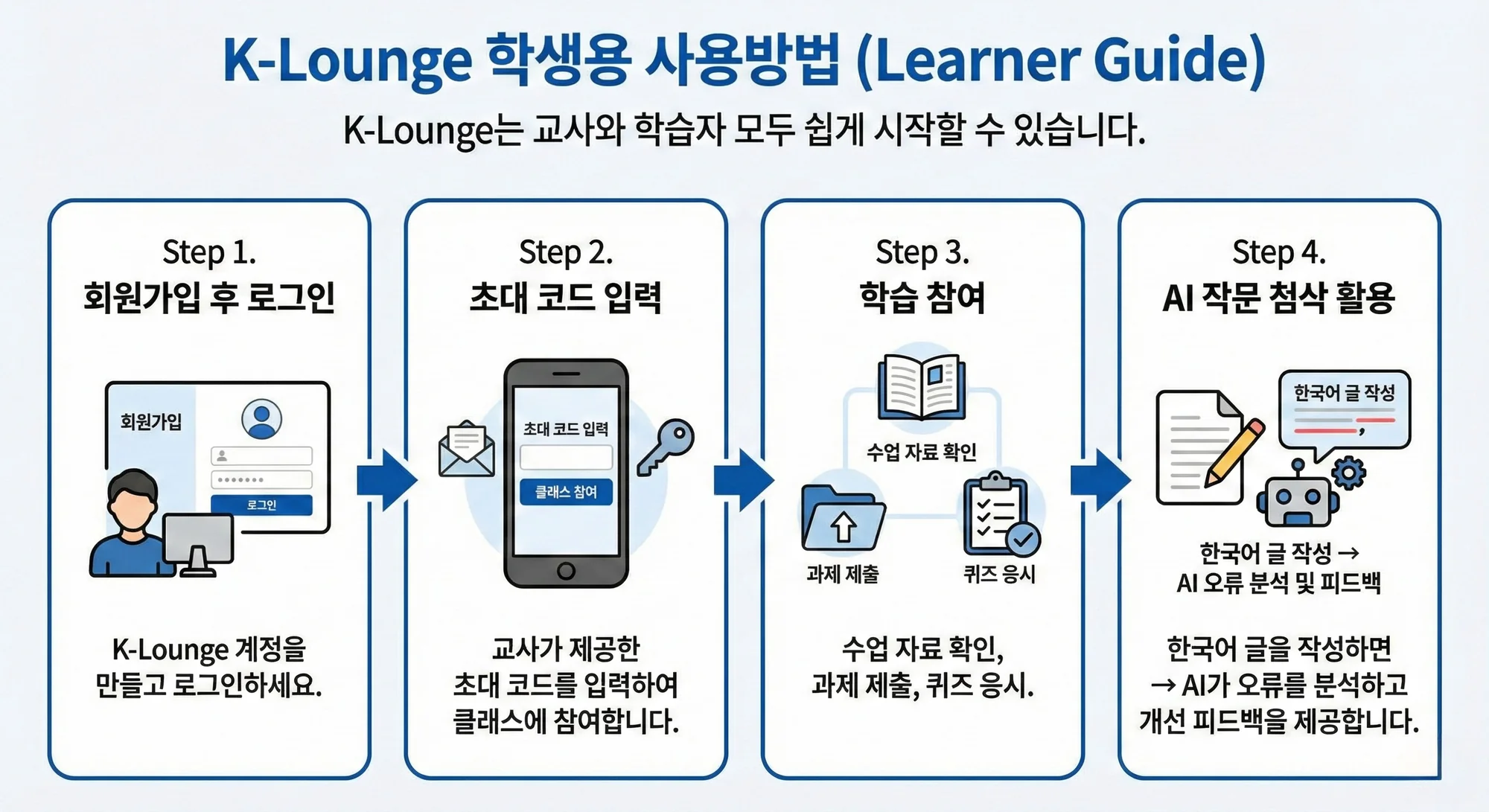
Step 1. Sign Up and Log In
Create an account and log in.
Step 2. Enter the Invitation Code
Enter the invitation code provided by your teacher to join the class.
Step 3. Participate in Learning
Check course materials
Submit assignments
Take quizzes
Step 4. Use AI Writing Feedback
Write your text in Korean
→ The AI analyzes errors and provides improvement feedback.
학습자용 시작 가이드
Step 1. 회원가입 후 로그인
Step 2. 초대 코드 입력
교사가 제공한 초대 코드를 입력하여 클래스에 참여합니다.
Step 3. 학습 참여
수업 자료 확인
과제 제출
퀴즈 응시
Step 4. AI 작문 첨삭 활용
한국어 글을 작성하면
→ AI가 오류를 분석하고 개선 피드백을 제공합니다.